Features

Everything Quit Sweet can do

A complete look at Quit Sweet, grouped by what you are trying to do. Every screen shown here is a real capture from the app.

How do I record what I actually ate?

Logging has to be fast or it will not happen. A sweet takes a few taps, and every extra detail is optional.

Log sweets in a few taps

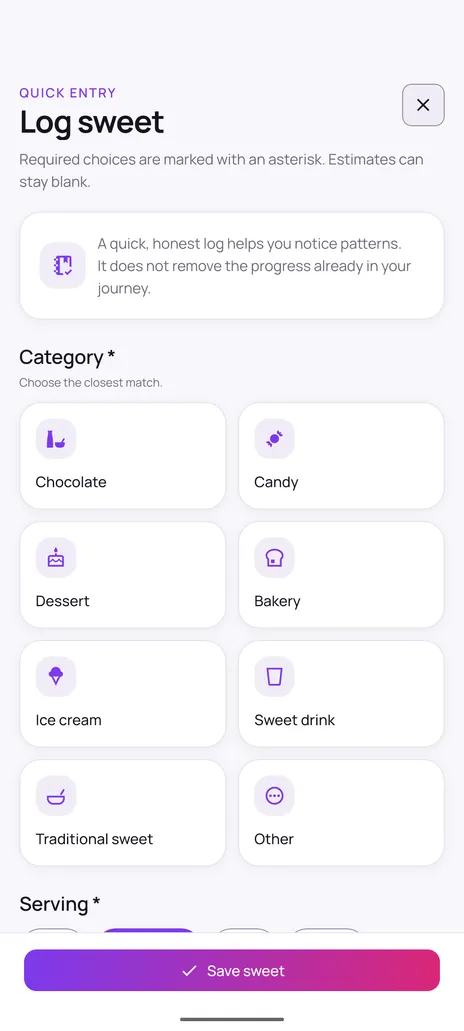
Logging is built to be fast enough to actually do. Choose from chocolate, candy, dessert, bakery, ice cream, sweet drink, traditional sweet or other, set the serving size, and save. Sugar grams and cost are optional fields you can leave blank — the app never requires you to look up nutrition data.

  • Eight sweet categories to choose from
  • Serving size and time recorded automatically
  • Sugar grams and cost stay optional
  • Add a trigger, mood before and after, or a note
A history you can review

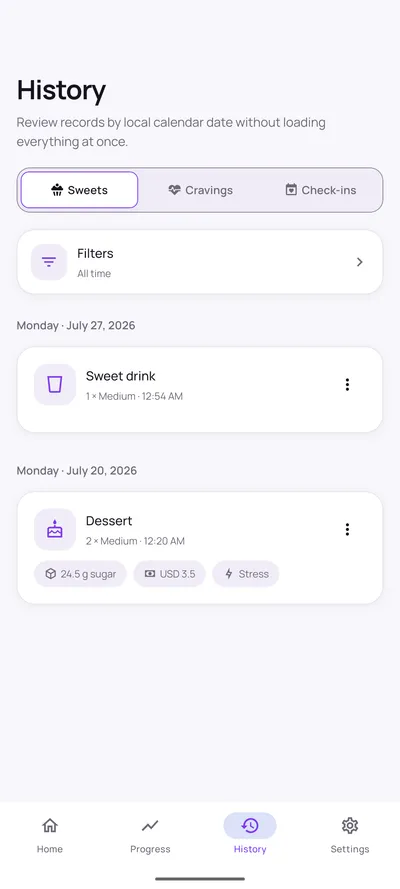
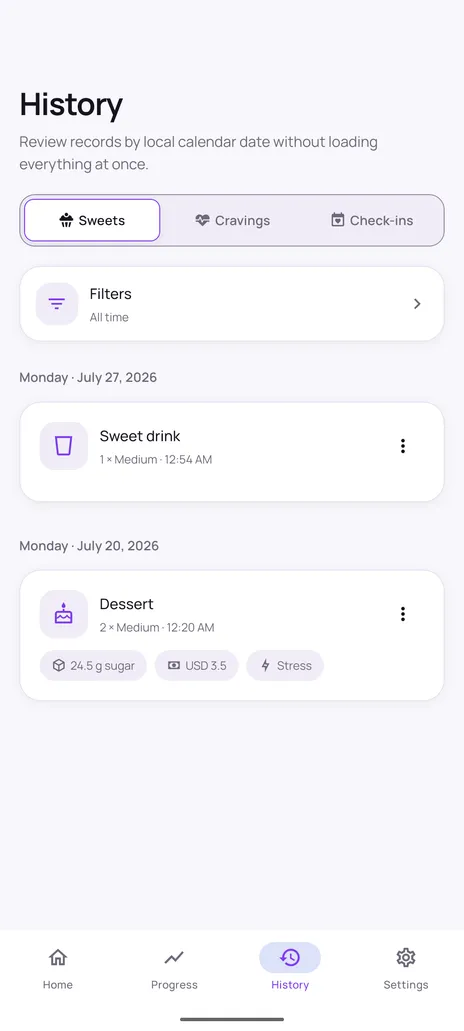
History keeps your records organised by local calendar date across three tabs — sweets, cravings and check-ins — and loads them in pages rather than all at once. A filter sheet narrows results to this week, this month, all time, or a custom range.

  • Separate tabs for sweets, cravings and check-ins
  • Entries grouped by local calendar date
  • Filter by week, month, all time or a custom range
  • Edit or remove individual entries

Also worth knowing

  • Eight categories: chocolate, candy, dessert, bakery, ice cream, sweet drink, traditional sweet and other.
  • Log something you ate earlier by changing the date and time on the entry.
  • Sugar grams and cost are optional — the app never asks you to look anything up.
Quit Sweet log sweet screen with eight category tiles: chocolate, candy, dessert, bakery, ice cream, sweet drink, traditional sweet and other.
Log a sweet in a few taps
Quit Sweet history screen listing logged sweets grouped by date, with category, serving size, time and optional sugar, cost and trigger details.
History, grouped by date

What am I actually working towards?

Pick the goal style that matches where you are now. Quit Sweet measures your progress against that choice, and only that choice.

Three goal modes

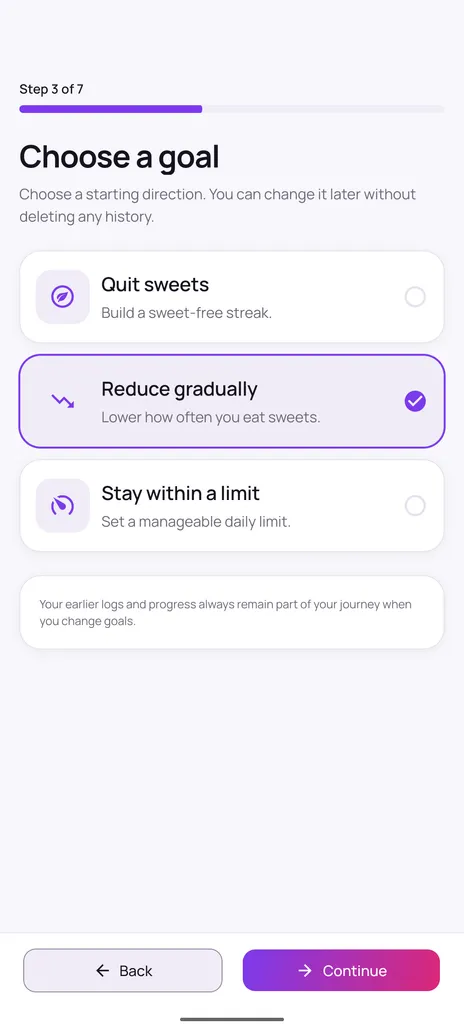
Different people need different targets, so Quit Sweet offers three modes. Quit sweets builds a sweet-free streak. Reduce gradually lowers how often you eat sweets against a weekly target. Stay within a limit gives you a manageable daily allowance. Switching modes recalculates your statistics from entries you already saved, without deleting any history.

  • Quit sweets — build a sweet-free streak
  • Reduce gradually — lower a weekly count
  • Stay within a limit — keep a daily allowance
  • Change modes at any time and keep your history

Also worth knowing

  • Set a baseline and a target during setup, then adjust either at any time.
  • Changing goal mode recalculates your statistics from entries you already saved.
  • No history is deleted when your goal changes.
See how setup works
Quit Sweet onboarding goal step offering three modes: quit sweets, reduce gradually, and stay within a limit.
Choose a goal that fits you

What do I do when a craving hits?

Open Craving Help for a short, optional pause. Every step can be skipped, and recording the craving is useful whatever you decide.

Support when a craving hits

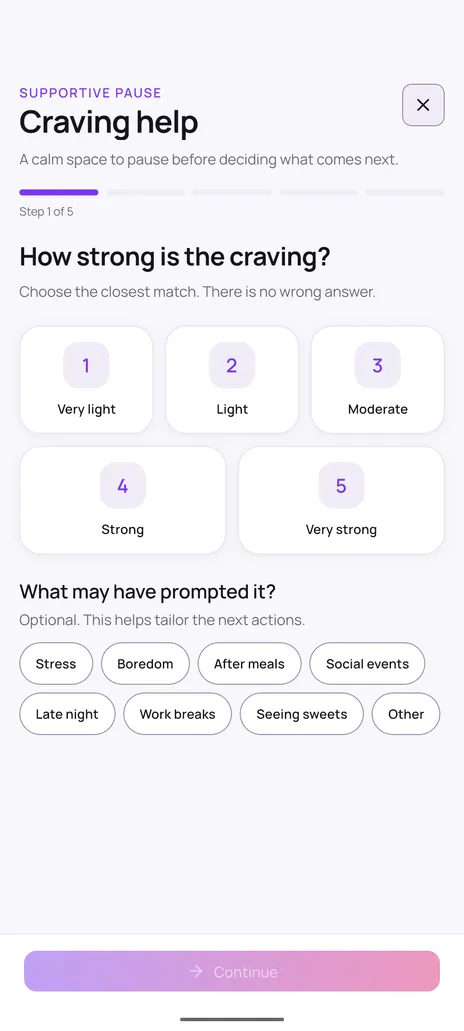
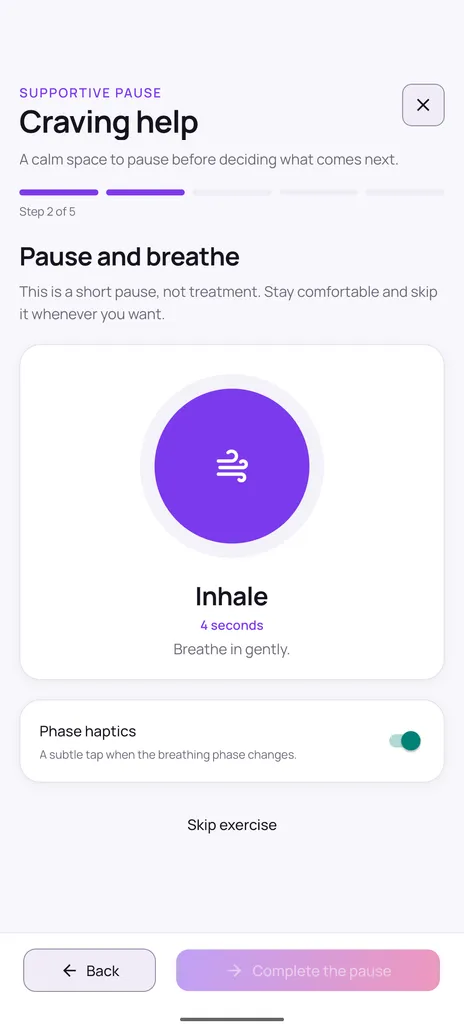
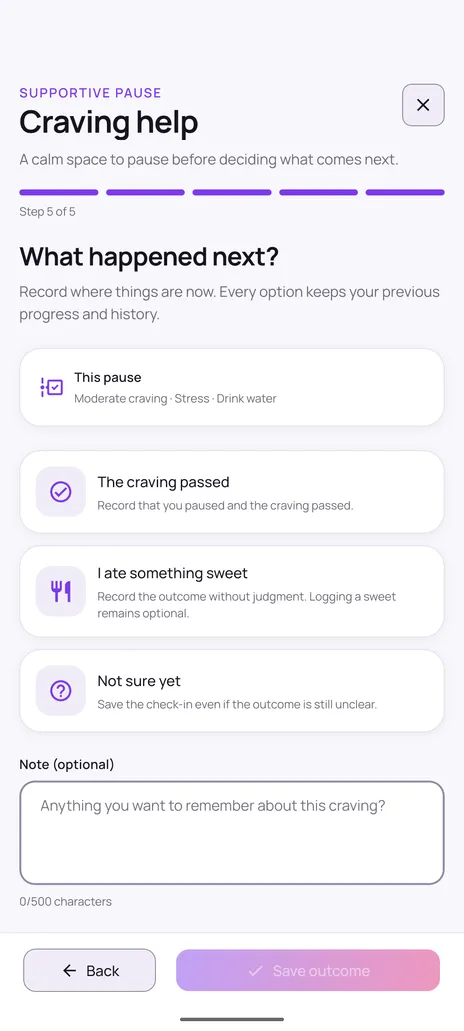
Craving help is a calm space to pause before deciding what comes next. You rate the intensity, optionally note what prompted it, take a short guided breathing pause, and can delay the decision by three, five or ten minutes. Then you pick one small alternative action and record the outcome — including if you ate something sweet. Every option keeps your previous progress.

  • Rate intensity from very light to very strong
  • Short guided breathing pause you can skip anytime
  • Delay the decision by 3, 5 or 10 minutes
  • Suggested alternatives like water, a walk, or messaging someone
  • Record the outcome without judgment

Daily check-ins

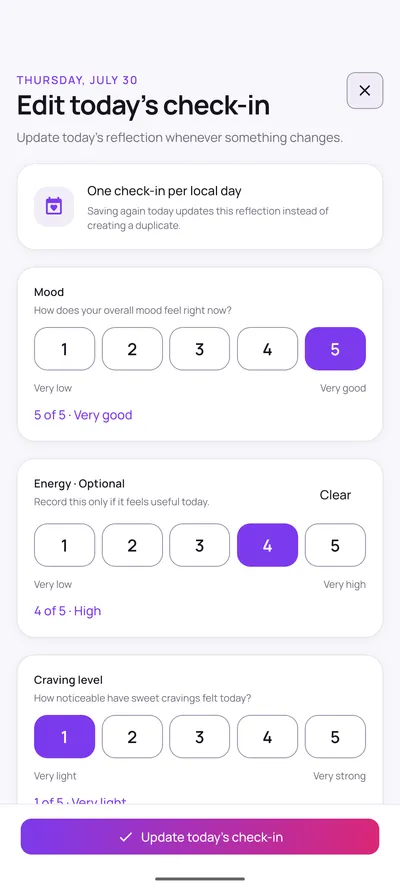
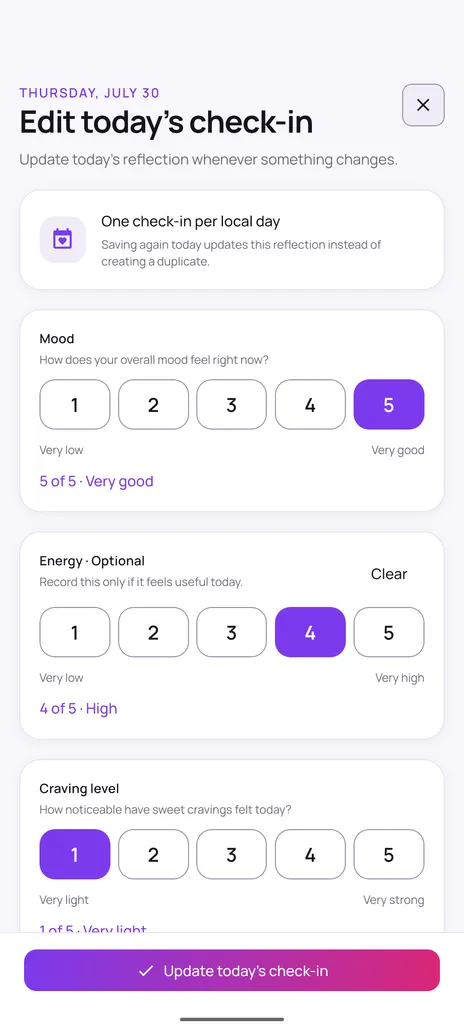
Once a day you can record how you are doing on simple one-to-five scales for mood, energy and craving level. Energy is optional if it does not feel useful that day. Saving again on the same day updates that reflection instead of creating a duplicate, so your history stays clean.

  • Mood, energy and craving level on 1–5 scales
  • Energy is optional and can be cleared
  • One check-in per local day, editable any time
  • Check-ins appear in your history and progress

Also worth knowing

  • Rate intensity from very light to very strong, and note what prompted it.
  • A guided breathing pause, with an optional 3, 5 or 10 minute delay.
  • Record the outcome honestly — including when you ate something.
More on the craving flow
First step of the Quit Sweet craving help flow asking how strong the craving is, with intensity options from very light to very strong and optional trigger chips.
Craving help — rate the craving
Quit Sweet daily check-in screen with one-to-five rating scales for mood, optional energy, and craving level.
Daily check-in

How do I know whether anything is changing?

Progress is built from what you recorded. Nothing is inferred, and nothing leaves your device.

Progress you can actually read

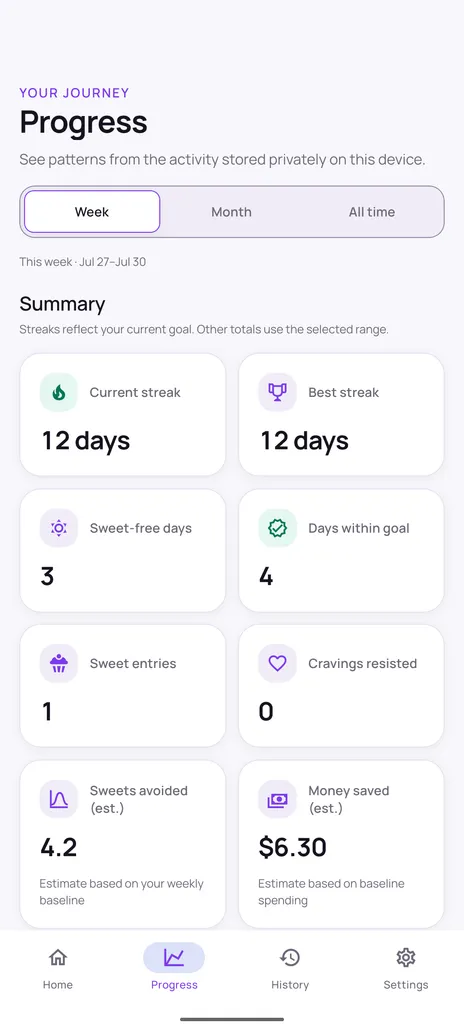
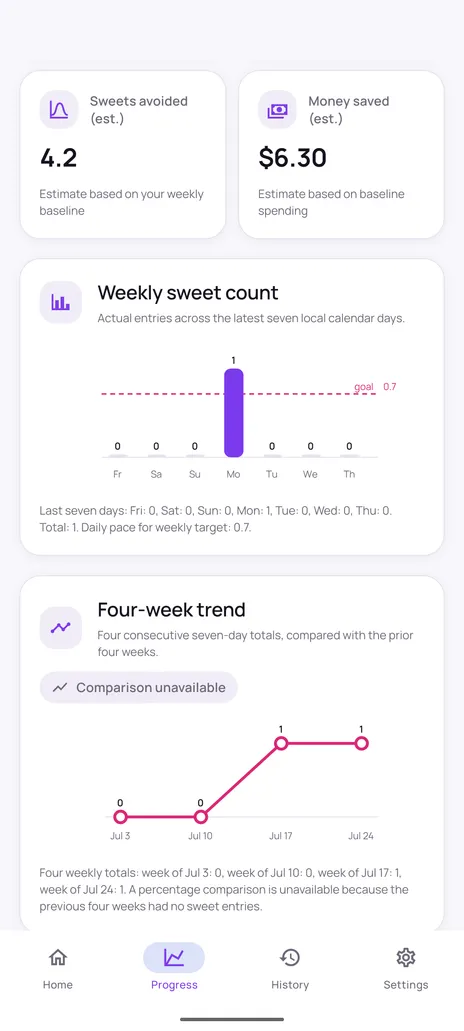
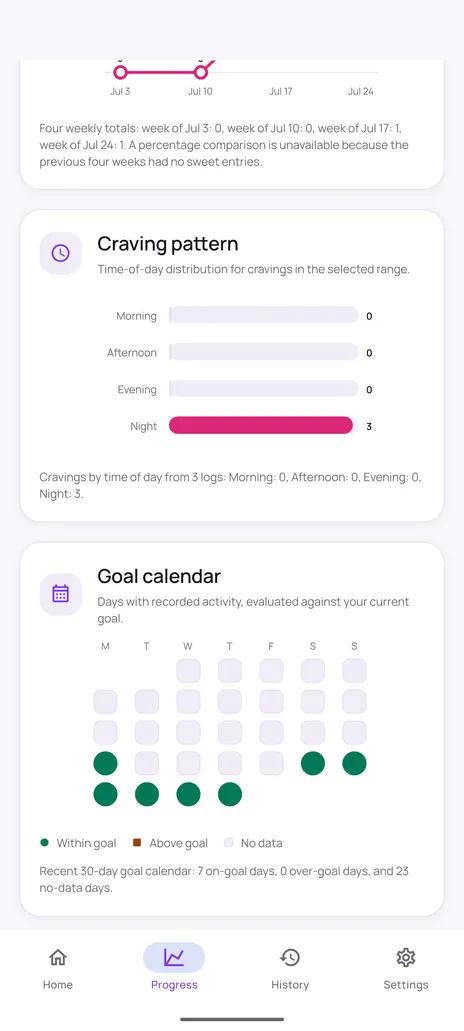
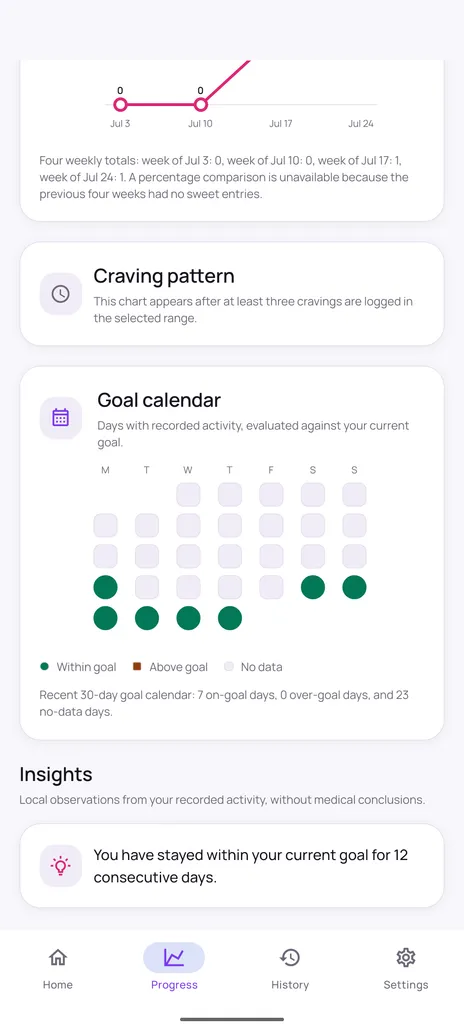
The progress tab shows what your recorded activity actually says, across week, month or all-time ranges. You get current and best streak, sweet-free days, days within goal, a weekly bar chart with your goal line, a four-week trend, a thirty-day goal calendar, and a breakdown of when cravings tend to happen. When there is not enough data for a comparison, the app says so instead of guessing.

  • Current streak, best streak and sweet-free days
  • Weekly sweet count against your goal line
  • Four-week trend and a 30-day goal calendar
  • Craving distribution across morning, afternoon, evening and night
  • Optional estimates for sweets avoided and money saved

Milestones worth noticing

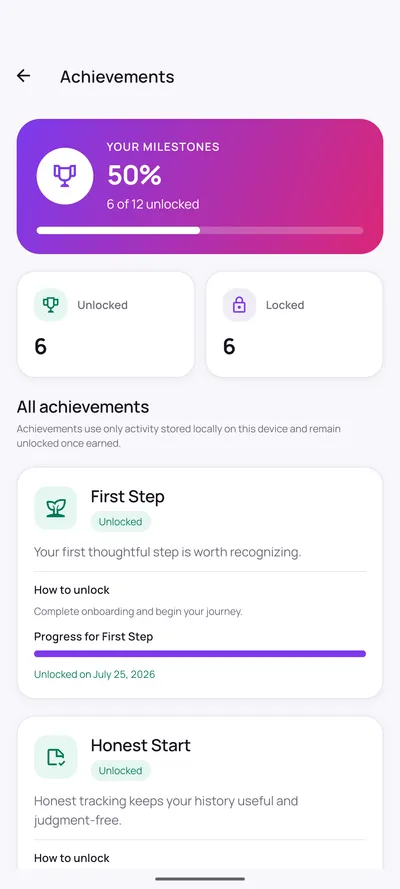
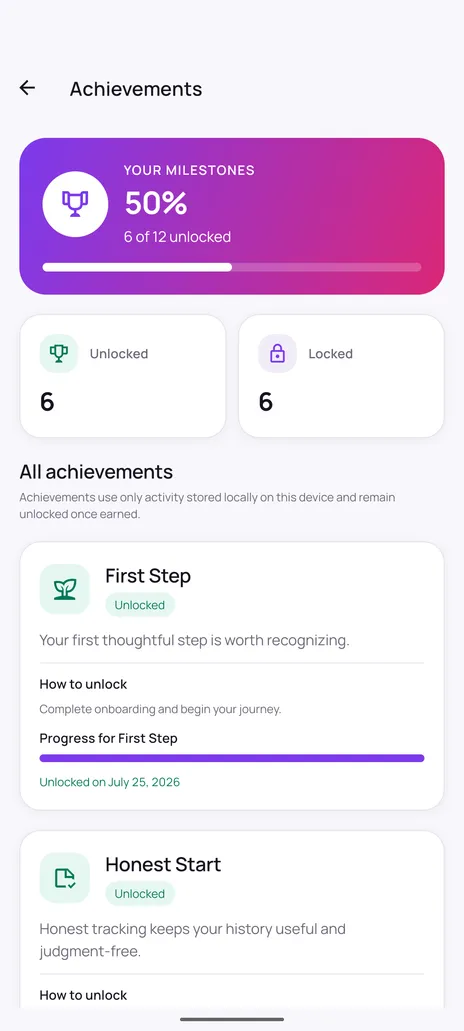
Achievements mark progress like completing setup or tracking honestly. They are calculated from activity stored locally on your device and stay unlocked once earned, so a difficult day never takes one away.

  • Twelve milestones with clear unlock conditions
  • Progress shown for milestones not yet earned
  • Calculated from local activity only
  • Stay unlocked once earned

Also worth knowing

  • Week, month and all-time ranges for every chart.
  • A 30-day goal calendar marking on-goal, over-goal and no-data days.
  • Sweets avoided and money saved are estimates based on the baseline you entered.
More on progress tracking
Quit Sweet progress screen with a week, month and all-time selector above summary cards for current streak, best streak, sweet-free days, days within goal, sweet entries and estimated money saved.
Progress summary
Quit Sweet achievements screen showing six of twelve milestones unlocked, with the First Step and Honest Start milestones and how to unlock them.
Achievements and milestones

How do I keep it going without being nagged?

Reminders are optional, scheduled locally on your device, and limited to three categories so they stay useful.

Reminders on your terms

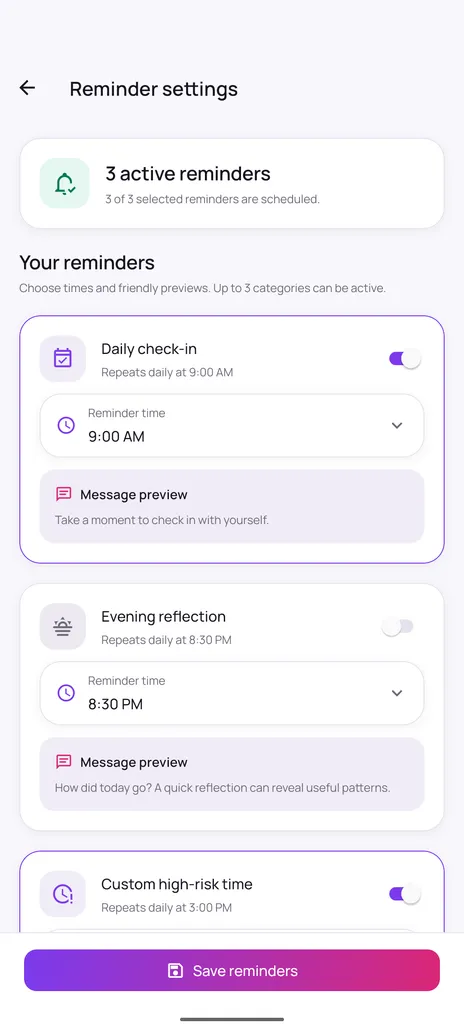
You choose which reminders to enable, what time each one fires, and you can preview the exact wording before turning it on. Reminders are scheduled locally on your device and need Android notification permission, which you can revoke at any time.

  • Daily check-in, evening reflection and a custom high-risk time
  • Pick the time for each reminder
  • Preview the message text before enabling
  • Up to three categories active at once

Comfortable to use

Choose a fixed light or dark appearance or follow your device setting, with changes applying immediately. Haptic feedback can be switched off, and reduced motion can follow Android or be set explicitly, so the app stays comfortable however you prefer to use it.

  • System, light or dark appearance
  • Haptic feedback toggle
  • Reduced motion: follow system, on, or off
  • Currency selection for cost estimates

Also worth knowing

  • Choose your own times and preview the exact message before enabling it.
  • Notification permission is only requested when you turn a reminder on.
  • Light, dark or system appearance, plus haptic and reduced-motion settings.
Quit Sweet reminder settings screen with three active local reminders, editable times and preview text for each reminder message.
Local reminders you control
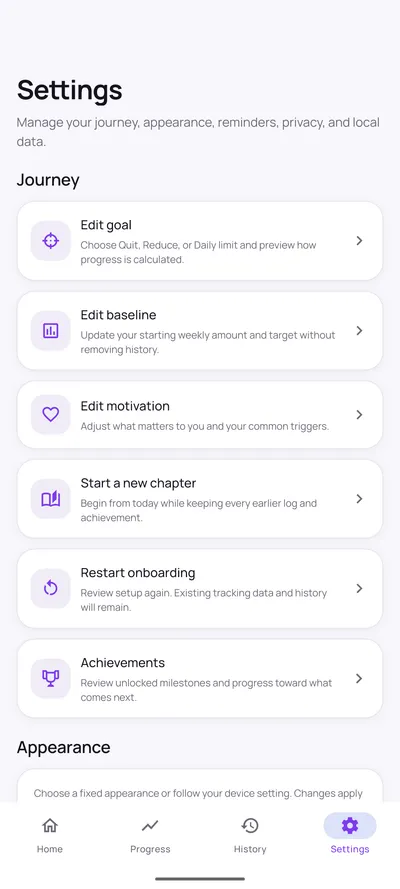
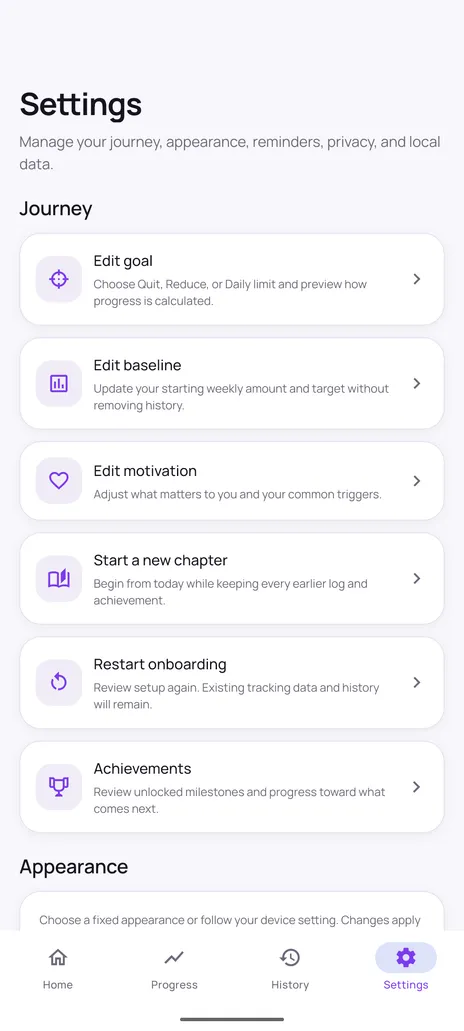
Quit Sweet settings screen with journey options to edit goal, edit baseline, edit motivation, start a new chapter, restart onboarding and view achievements.
Settings — your journey stays editable

Who can see my information?

Only you. There is no account, and your habit records are stored locally on your device.

Private by design

Quit Sweet does not require an account and does not send your habit data to a remote server. Your tracking information is stored locally on your device, which is also why the app works offline. Reminders are scheduled locally by Android rather than pushed from a server.

  • Tracking information stored locally on your device
  • No account or sign-up required
  • Works offline
  • Local reminders, not server push notifications

Also worth knowing

  • No sign-up, no login, no profile.
  • No advertising SDK and no analytics SDK in the app.
  • Export your records, or delete everything, from inside the app at any time.
Read the privacy policy
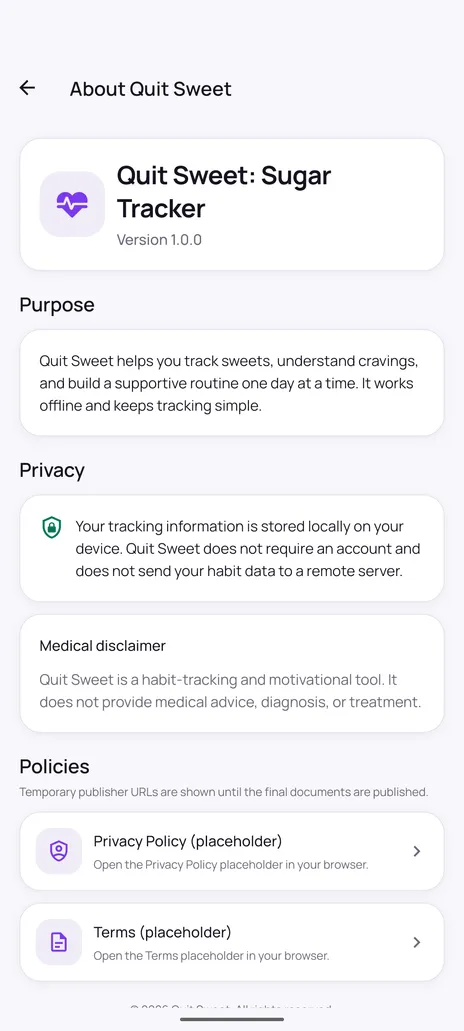
Quit Sweet about screen explaining that tracking information is stored locally on the device, that no account is required, and that the app is a habit-tracking tool rather than medical advice.
About — privacy and disclaimer

Screenshots

Every screen, as it really looks

All 20 captures below come straight from Quit Sweet running on Android — no mockups, no rendered marketing art.

Home3

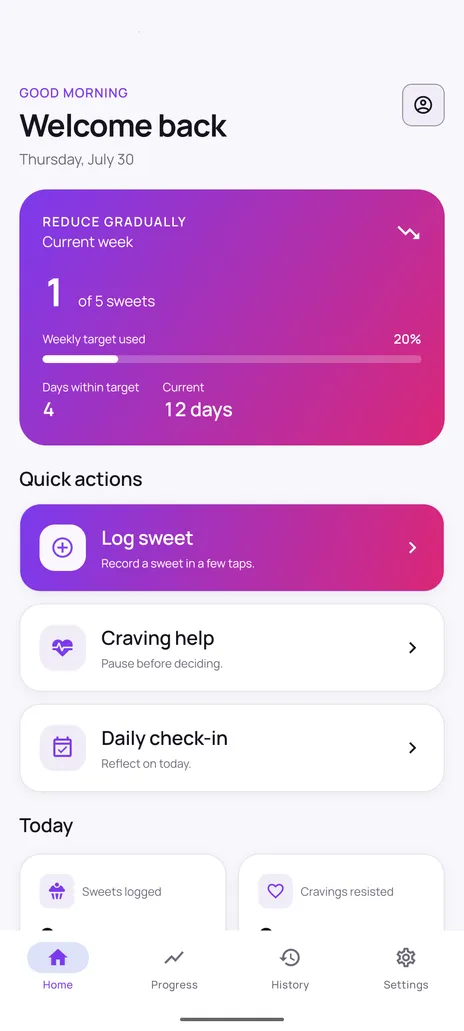
  • Quit Sweet home screen showing a Reduce gradually goal card with one of five sweets used this week, a twelve day streak, and quick actions for logging a sweet, craving help, and a daily check-in.

    Home dashboard

    The screen you land on: your current goal, this week's count against your target, your streak, and one-tap access to logging, craving help and the daily check-in.

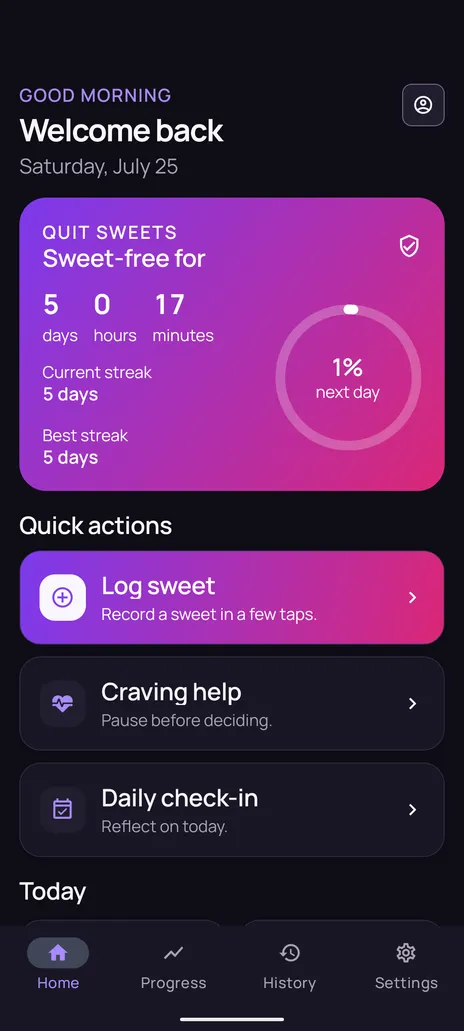
  • Quit Sweet home screen in dark theme showing Quit sweets mode with a sweet-free timer reading five days, zero hours and seventeen minutes, plus current and best streak of five days.

    Quit sweets mode (dark)

    The same home screen in Quit sweets mode and dark theme, counting a sweet-free run down to the minute.

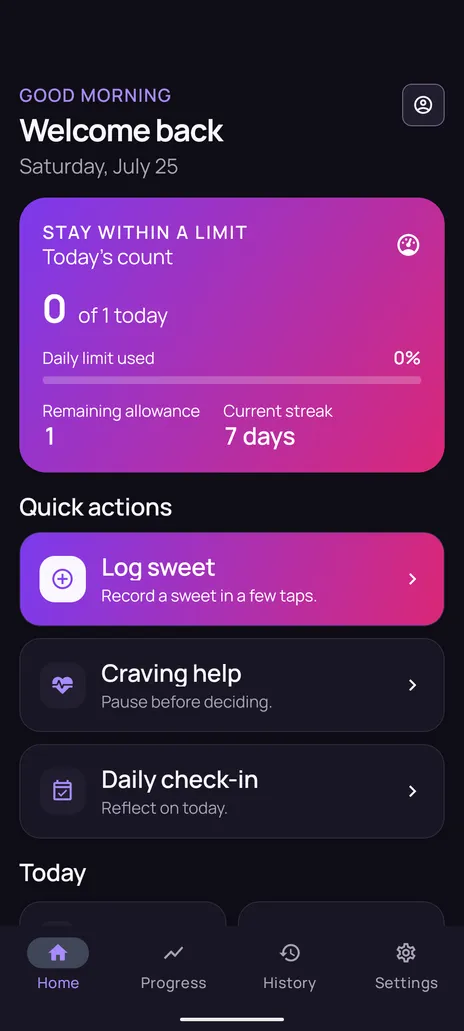
  • Quit Sweet home screen in dark theme showing Stay within a limit mode with zero of one sweet used today, a remaining allowance of one, and a seven day streak.

    Daily limit mode (dark)

    Stay within a limit mode, showing today's count against the daily allowance and how much is left.

Logging2

  • Quit Sweet log sweet screen with eight category tiles: chocolate, candy, dessert, bakery, ice cream, sweet drink, traditional sweet and other.

    Log a sweet

    Eight categories to choose from. Serving size and time are recorded for you; sugar grams and cost stay optional.

  • Quit Sweet daily check-in screen with one-to-five rating scales for mood, optional energy, and craving level.

    Daily check-in

    Mood, optional energy and craving level on a 1-5 scale. One entry per day, editable whenever something changes.

Craving support3

  • First step of the Quit Sweet craving help flow asking how strong the craving is, with intensity options from very light to very strong and optional trigger chips.

    Rate the craving

    Step one of the craving flow: how strong it feels, and optionally what set it off.

  • Second step of the Quit Sweet craving help flow showing a breathing circle with an inhale prompt for four seconds and an option to skip the exercise.

    Breathing pause

    A short guided breathing exercise with phase haptics, skippable at any point.

  • Final step of the Quit Sweet craving help flow recording what happened next, with options for the craving passed, ate something sweet, or not sure yet.

    Record the outcome

    The final step: the craving passed, you ate something sweet, or you are not sure yet. Every option keeps your history.

Progress5

  • Quit Sweet progress screen with a week, month and all-time selector above summary cards for current streak, best streak, sweet-free days, days within goal, sweet entries and estimated money saved.

    Progress summary

    Streaks, on-goal days and the estimated figures, across week, month and all-time ranges.

  • Quit Sweet progress charts showing a weekly sweet count bar chart with a goal line and a four-week trend line chart.

    Weekly count and trend

    A seven-day bar chart against your target, plus four consecutive weekly totals for a longer view.

  • Quit Sweet craving pattern chart showing time-of-day distribution across morning, afternoon, evening and night.

    Craving patterns

    Craving logs grouped into morning, afternoon, evening and night, so the timing of the habit becomes visible.

  • Quit Sweet goal calendar showing a thirty day grid marking days within goal, days above goal and days with no recorded data.

    Goal calendar

    A 30-day grid marking each day on-goal, over-goal or no-data, so gaps are as visible as successes.

  • Quit Sweet achievements screen showing six of twelve milestones unlocked, with the First Step and Honest Start milestones and how to unlock them.

    Achievements

    Twelve milestones based on your own local activity. Each shows how to unlock it and how far along you are.

History1

  • Quit Sweet history screen listing logged sweets grouped by date, with category, serving size, time and optional sugar, cost and trigger details.

    History

    Sweets, cravings and check-ins in three tabs, grouped by local calendar date and filterable by range.

Settings2

  • Quit Sweet settings screen with journey options to edit goal, edit baseline, edit motivation, start a new chapter, restart onboarding and view achievements.

    Settings

    Edit your goal, baseline and motivation at any time. Changing them recalculates statistics without deleting history.

  • Quit Sweet reminder settings screen with three active local reminders, editable times and preview text for each reminder message.

    Reminder settings

    Up to three local reminder categories, with your own times and a preview of the exact message.

Getting started3

  • Quit Sweet onboarding goal step offering three modes: quit sweets, reduce gradually, and stay within a limit.

    Choose a goal

    Pick Quit sweets, Reduce gradually or Stay within a limit. The choice can change later without losing history.

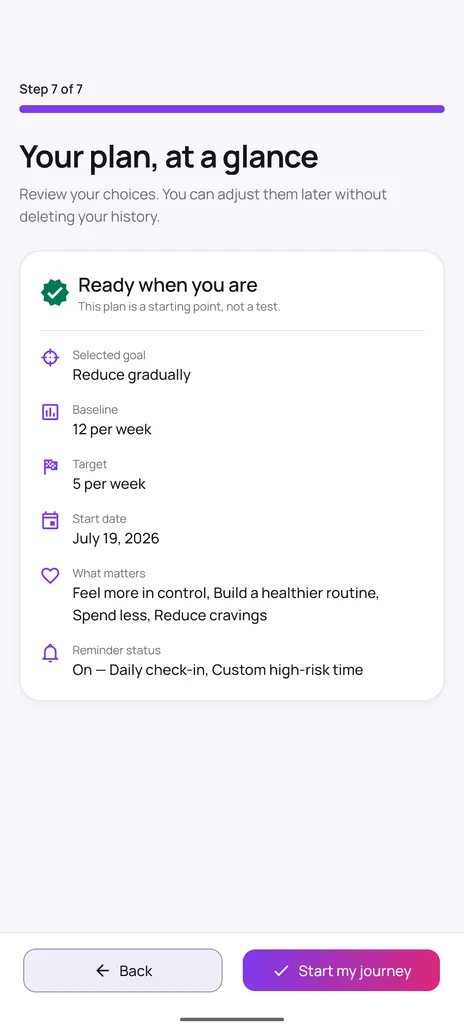
  • Quit Sweet onboarding summary listing the chosen goal, weekly baseline, weekly target, start date, personal motivations and reminder status.

    Your plan

    A review of the goal, baseline, target, start date and reminders before tracking begins.

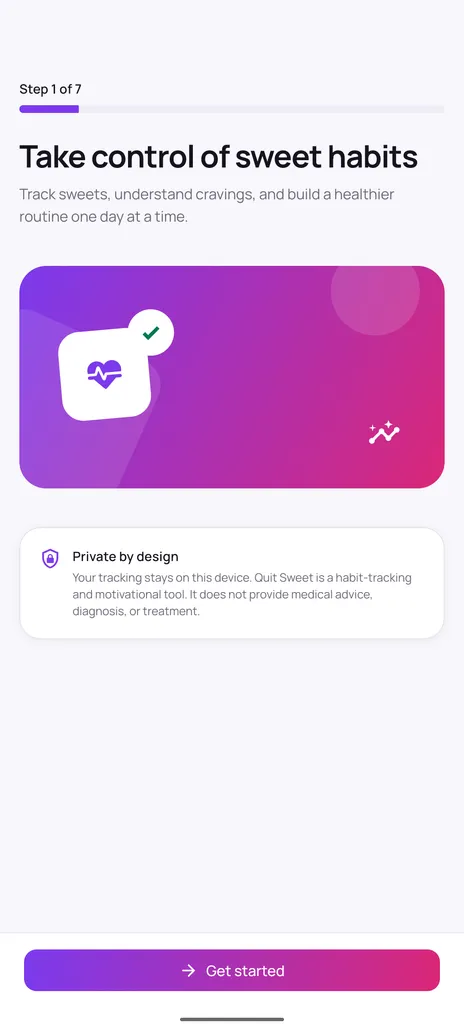
  • Quit Sweet onboarding welcome step with the heading take control of sweet habits and a private by design notice explaining that tracking stays on the device.

    Welcome

    The first screen, which states the privacy position and the medical disclaimer before anything is entered.

Privacy1

  • Quit Sweet about screen explaining that tracking information is stored locally on the device, that no account is required, and that the app is a habit-tracking tool rather than medical advice.

    About and privacy

    The app's own privacy summary and medical disclaimer, shown in-app rather than buried in a store listing.

Ready to try it?

Setup takes a few minutes and everything stays on your device. If you would rather read first, the setup walkthrough covers each step, and the questions page answers the common ones.

Coming soon on Google Play

Free · Android · No account required